The Story
IK Multimedia iRig Stream Mic USB Stereo USB Microphone Interface (1143456)
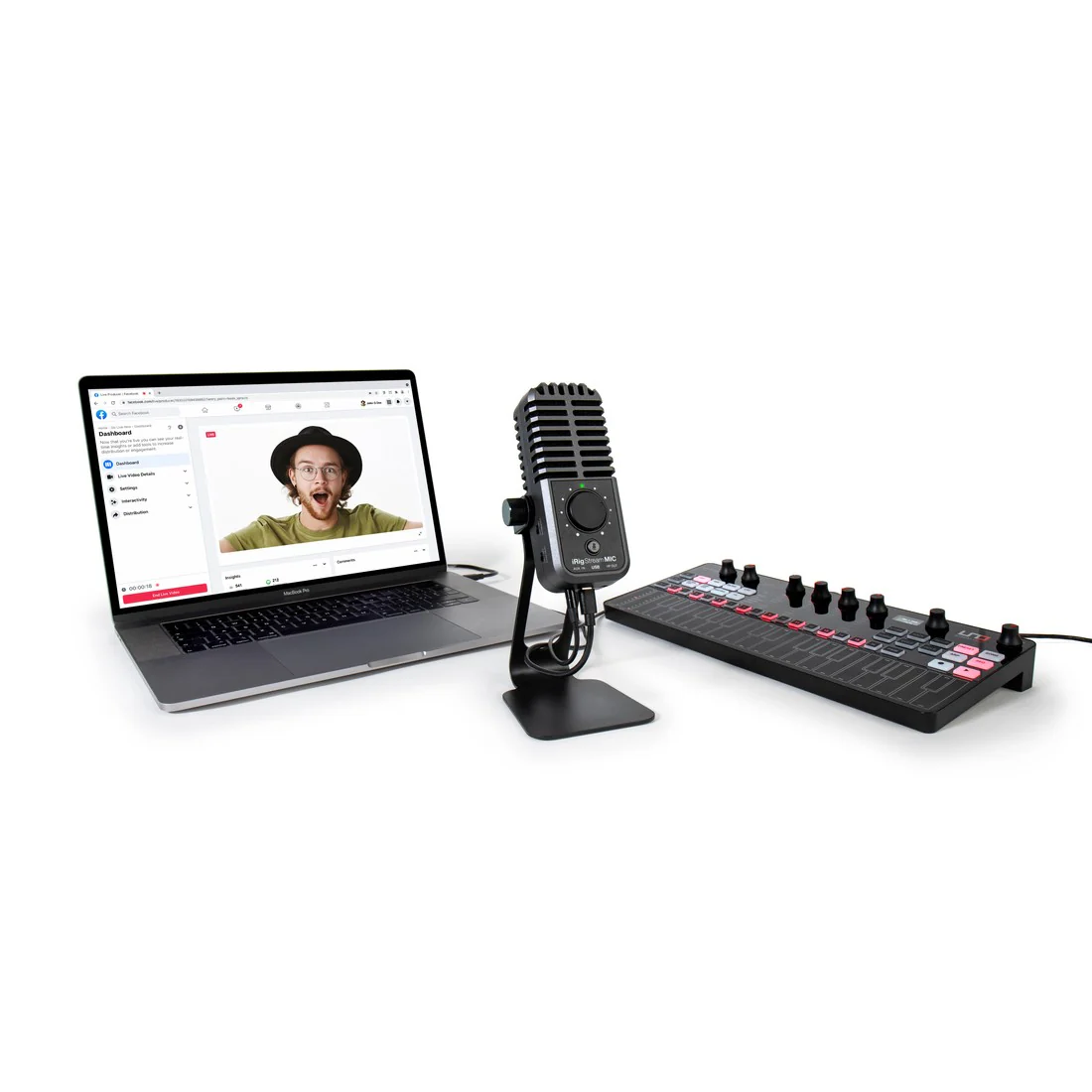
The IK Multimedia iRig Stream Mic USB microphone provides a compact way to capture your voice while mixing in external sources for Mac and PC. It helps you keep a clean, controllable audio signal for recording or livestreaming, with monitoring and mixing controls right on the mic.
Capture clear vocals with focused pickup
The cardioid, unidirectional pattern focuses on the speaker or singer and rejects background noise, so your voice comes through clearly. You can also adjust the mic gain easily, which helps you dial in a crisp and detailed signal.
- ½" gold-plated cardioid condenser capsule
- Adjustable microphone gain
- Onboard high-pass filter to reduce noise
- Mic mute button
Mix external gear directly into your stream
The built-in stereo audio interface lets you connect keyboards, mixers, drum machines, turntables, and more through the 3.5 mm stereo input. As a result, you can combine mic and line signals into a single stereo stream without extra boxes on your desk.
- 16-bit / 48 kHz audio interface for Mac/PC
- 3.5 mm stereo AUX input for external sources
- Mic and line signals mixed into a stereo stream
Add computer audio with Loopback
Loopback lets you blend audio from your Mac/PC into your recording or broadcast alongside the microphone and stereo line input. For instance, you can add backing tracks, sound effects, or theme music before sending audio to streaming apps such as Instagram or TikTok.
- Loopback switch
- Combines mic, stereo line input, and host audio into one stereo track
Monitor and control levels in real time
Direct monitoring through the headphone output lets you check your sound and levels with any app, even before recording. LED level indicators make gain changes easier to manage at a glance, and each input includes its own volume control for quick adjustments while on camera.
- Headphone output with direct monitoring
- Headphone volume control
- Monitor mix control
- LED level meter
- Main level knob
Connectivity and compatibility
The mic draws power from your computer and connects to Mac/PC using the included USB-C to USB-C cable. It also works with any application that records or streams audio or video, which keeps your workflow flexible across platforms and apps.
- USB-C connection to host
- USB-C to USB-C cable included
- Lightning devices require Apple Lightning to USB 3 Camera Adapter and a USB-C to USB-A cable (sold separately)
Frequently Asked Questions
- Can I mix my microphone with an external keyboard or mixer for a single stereo stream? Yes. The 3.5 mm stereo input lets you connect external sources, and the mic mixes the microphone signal and line input into a stereo stream.
- How do I add music or computer audio into my livestream or recording? Use the Loopback function to mix audio from your Mac/PC into your recording or stream along with the microphone and stereo line input.
- Can I monitor my sound before I go live? Yes. The headphone output provides direct monitoring so you can check levels with any app, even before recording.
- Will it work with streaming and recording apps? It works with any application that records or streams audio or video, including apps used for livestreaming.
Add the IK Multimedia iRig Stream Mic USB microphone to your cart to streamline your recording or streaming setup with integrated mixing and monitoring controls. Contact or visit Gibbys Electronic Supermarket for expert advice on choosing the right microphones, audio interfaces, and streaming accessories for your workflow.

Details & Craftsmanship
Every detail has been carefully considered to bring you the perfect product.

Details & Craftsmanship
Every detail has been carefully considered to bring you the perfect product.

Details & Craftsmanship
Every detail has been carefully considered to bring you the perfect product.

Details & Craftsmanship
Every detail has been carefully considered to bring you the perfect product.

Details & Craftsmanship
Every detail has been carefully considered to bring you the perfect product.

Details & Craftsmanship
Every detail has been carefully considered to bring you the perfect product.

Details & Craftsmanship
Every detail has been carefully considered to bring you the perfect product.

Details & Craftsmanship
Every detail has been carefully considered to bring you the perfect product.

Details & Craftsmanship
Every detail has been carefully considered to bring you the perfect product.

Details & Craftsmanship
Every detail has been carefully considered to bring you the perfect product.
Details & Craftsmanship
Every detail has been carefully considered to bring you the perfect product.

Details & Craftsmanship
Every detail has been carefully considered to bring you the perfect product.

Details & Craftsmanship
Every detail has been carefully considered to bring you the perfect product.

Details & Craftsmanship
Every detail has been carefully considered to bring you the perfect product.

Details & Craftsmanship
Every detail has been carefully considered to bring you the perfect product.

Details & Craftsmanship
Every detail has been carefully considered to bring you the perfect product.

Details & Craftsmanship
Every detail has been carefully considered to bring you the perfect product.

Details & Craftsmanship
Every detail has been carefully considered to bring you the perfect product.

Details & Craftsmanship
Every detail has been carefully considered to bring you the perfect product.

Details & Craftsmanship
Every detail has been carefully considered to bring you the perfect product.
Description
IK Multimedia iRig Stream Mic USB Stereo USB Microphone Interface (1143456)
The IK Multimedia iRig Stream Mic USB microphone provides a compact way to capture your voice while mixing in external sources for Mac and PC. It helps you keep a clean, controllable audio signal for recording or livestreaming, with monitoring and mixing controls right on the mic.
Capture clear vocals with focused pickup
The cardioid, unidirectional pattern focuses on the speaker or singer and rejects background noise, so your voice comes through clearly. You can also adjust the mic gain easily, which helps you dial in a crisp and detailed signal.
- ½" gold-plated cardioid condenser capsule
- Adjustable microphone gain
- Onboard high-pass filter to reduce noise
- Mic mute button
Mix external gear directly into your stream
The built-in stereo audio interface lets you connect keyboards, mixers, drum machines, turntables, and more through the 3.5 mm stereo input. As a result, you can combine mic and line signals into a single stereo stream without extra boxes on your desk.
- 16-bit / 48 kHz audio interface for Mac/PC
- 3.5 mm stereo AUX input for external sources
- Mic and line signals mixed into a stereo stream
Add computer audio with Loopback
Loopback lets you blend audio from your Mac/PC into your recording or broadcast alongside the microphone and stereo line input. For instance, you can add backing tracks, sound effects, or theme music before sending audio to streaming apps such as Instagram or TikTok.
- Loopback switch
- Combines mic, stereo line input, and host audio into one stereo track
Monitor and control levels in real time
Direct monitoring through the headphone output lets you check your sound and levels with any app, even before recording. LED level indicators make gain changes easier to manage at a glance, and each input includes its own volume control for quick adjustments while on camera.
- Headphone output with direct monitoring
- Headphone volume control
- Monitor mix control
- LED level meter
- Main level knob
Connectivity and compatibility
The mic draws power from your computer and connects to Mac/PC using the included USB-C to USB-C cable. It also works with any application that records or streams audio or video, which keeps your workflow flexible across platforms and apps.
- USB-C connection to host
- USB-C to USB-C cable included
- Lightning devices require Apple Lightning to USB 3 Camera Adapter and a USB-C to USB-A cable (sold separately)
Frequently Asked Questions
- Can I mix my microphone with an external keyboard or mixer for a single stereo stream? Yes. The 3.5 mm stereo input lets you connect external sources, and the mic mixes the microphone signal and line input into a stereo stream.
- How do I add music or computer audio into my livestream or recording? Use the Loopback function to mix audio from your Mac/PC into your recording or stream along with the microphone and stereo line input.
- Can I monitor my sound before I go live? Yes. The headphone output provides direct monitoring so you can check levels with any app, even before recording.
- Will it work with streaming and recording apps? It works with any application that records or streams audio or video, including apps used for livestreaming.
Add the IK Multimedia iRig Stream Mic USB microphone to your cart to streamline your recording or streaming setup with integrated mixing and monitoring controls. Contact or visit Gibbys Electronic Supermarket for expert advice on choosing the right microphones, audio interfaces, and streaming accessories for your workflow.